2D content in a 3D scene — before you go on site
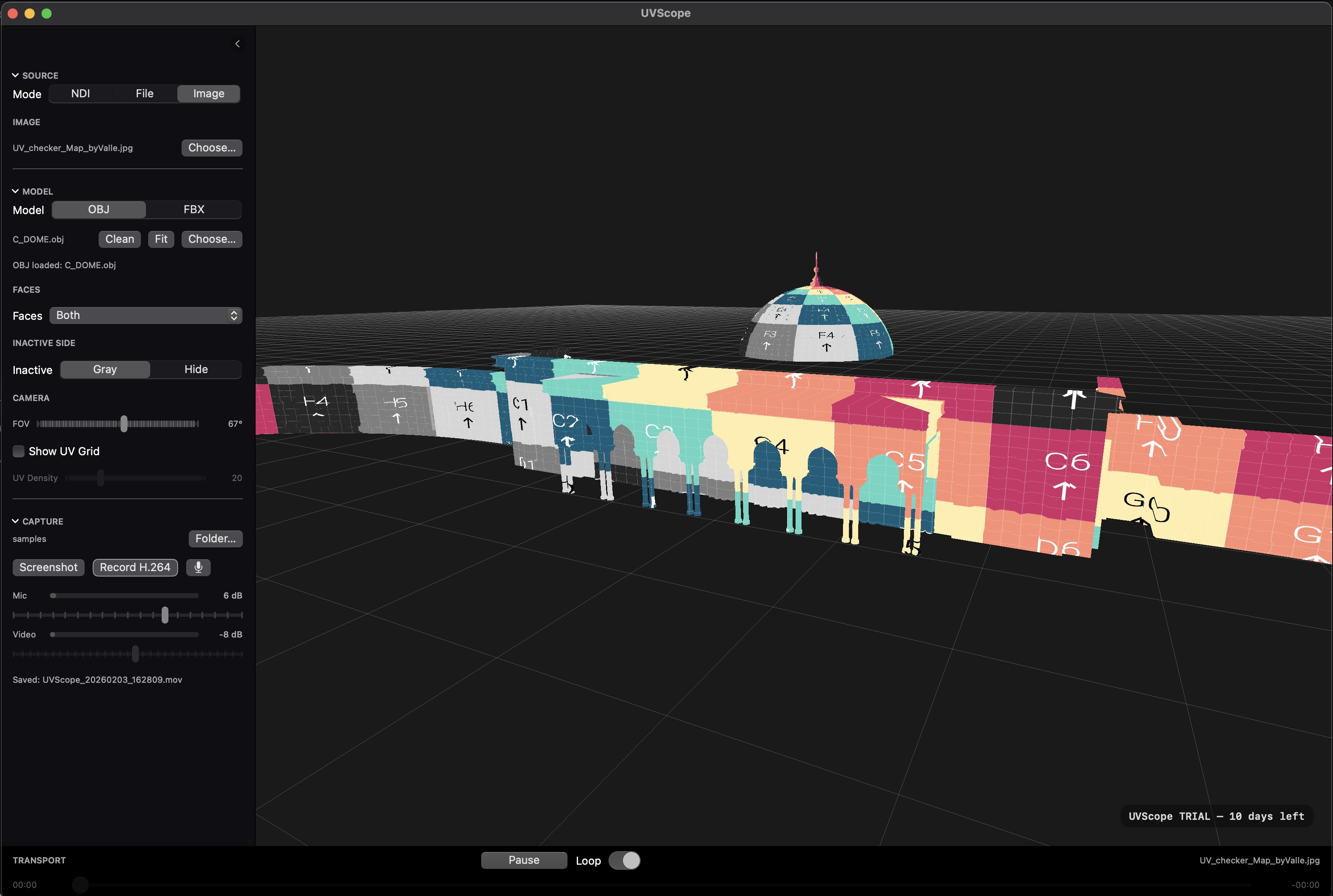
Preview video, graphics and live NDI on OBJ/FBX models. Instantly see how content sits on geometry, where lines break, and how edges, corners and seams really look.
Key features
2D content on 3D models
Preview video and graphics on OBJ/FBX geometry and immediately spot distortions, broken lines and problematic areas.
Built for projection mapping
A practical tool to validate mapping before the venue: architecture, installations and complex shapes in one scene.
Live NDI from 2D software
Receive NDI from After Effects, Resolume, VJ tools and any NDI-compatible app — edit where you’re comfortable and see results on 3D in realtime.
Video files and still images
Load clips and static images with loop, scrub bar and play/pause — perfect for offline preview when NDI isn’t needed.
FBX cameras & view presets
Import cameras from FBX and view the scene from director or render cameras, switch angles and lock camera position while freely looking around.
Reference video recording
Capture exactly what you see in H.264 + AAC, including video audio and microphone voice, for approvals and reviews.
Workflow
Load the scene
Open OBJ or FBX models. UVScope loads geometry, UVs and cameras into a ready-to-review scene.
Feed content
Select an NDI source or load a video/image file for offline preview.
Review and capture
Switch cameras and grids, adjust visibility and record reference videos with voice comments if needed.
Use cases
Pre-venue mapping validation
Test content on real geometry before arriving on site — fewer surprises, faster setup.
Realtime creative iteration
Adjust compositions in After Effects or Resolume and instantly see how they behave on the 3D object.
Client & art director reviews
Record clear reference videos with voice notes and send them for fast approvals.
Trial & license
Trial
- Full functionality
- No registration
- Offline file preview
- Realtime NDI
License
- 1 Mac (hardware fingerprint)
- Offline activation via license key
- No subscription
- Re-issue available if hardware changes
FAQ
What formats are supported?
Models: OBJ and FBX. Sources: NDI, MOV video files and PNG/JPG images.
What macOS version is required?
UVScope requires macOS 13.5 or later (Apple Silicon or Intel).
Does it work offline?
Yes. File-based preview works fully offline. NDI requires a network, licensing does not.
How does licensing work?
The trial runs for 10 days. After that, UVScope is activated using a license key tied to a hardware fingerprint.
What if I change my computer?
If your hardware fingerprint changes, a re-issue key is available.
How do I use NDI?
Select NDI as the source, choose the feed from the list, and UVScope applies it as a live texture on the model in realtime.
Can UVScope import cameras from FBX?
Yes. UVScope imports FBX cameras so you can review the scene through director or render camera angles.
What does camera lock mean?
Camera lock fixes the camera position while still allowing you to look around by rotating the view — ideal for consistent viewpoints during reviews.
Can I control face visibility and inactive sides?
Yes. UVScope supports Both / Front / Back face modes and inactive side display options such as Gray or Hide.
Is there scrubbing and looping for video files?
Yes. Video playback includes scrubbing, looping and play/pause controls for precise offline preview.
How does reference recording work?
UVScope records exactly what you see to H.264 + AAC, including video audio and microphone voice.
Can I balance microphone and video audio levels?
Yes. Separate gain controls and level meters help keep voice comments clear over the content audio.
Is UVScope suitable for client presentations?
Yes. The clean UI, shortcuts and quick view switching make it ideal for art directors and client reviews.